
PARKING SURVEILLANCE MODE
*Requires Hardwiring Cable or OBD II Power Cable and installation for Parking Surveillance mode. Professional installation is recommended.
Parking Surveillance mode is automatically activated when you turn off the ignition, and captures footage when a motion or impact is detected so you have video evidence of mishaps like hit-and-runs while you are away from your vehicle.

Radar Parking Mode
Radar Parking Mode uses low-power front and rear radars to monitor motion, ensuring extended parking surveillance with minimal power consumption. When the radar detects movement in the selected range, the dash cam wakes up from a low-power state and records a 20-second video clip.
U3000: Built-in Radar Module. U1000 Plus and Q1000: Optional Radar Module.
Watch Video
Smart Parking Mode
Prevents heat-related damage by automatically switching the dash cam to low-power mode if the temperature inside the vehicle becomes too high during Parking mode.
In Smart Parking Mode, the dash cam records incidents triggered by impacts only until its operating temperature is safe again to resume Motion and Impact Detection or Timelapse Parking Mode.
U3000, U1000 Plus, Q850, Q200, ARC, F70 PRO
Watch Video
Energy Saving Mode
In Energy Saving mode, the dash cam goes on standby when entering Parking Surveillance mode and wakes up to record events triggered by impacts only.
This allows the dash cam to conserve energy and increase up to three times the total duration of the dash cam Parking Surveillance mode.
Watch Video
Time Lapse
Time Lapse in Parking mode records footage at 2FPS, enabling the dash cam to record long periods of parking surveillance continuously without increasing power consumption.
Watch Video
Motion Detection
Monitor and capture any motion around the vehicle for potential vandalism attempts.
Watch Video
IMPACT DETECTION
Monitor any impact to the vehicle while it is parked to catch any hit-and-run driver in the act while you are away.
Watch VideoBenefits of RADAR Parking Mode
The RADAR Parking mode is an energy-efficient recording feature that harnesses the U3000 built-in radar system to monitor motion while consuming minimal power.
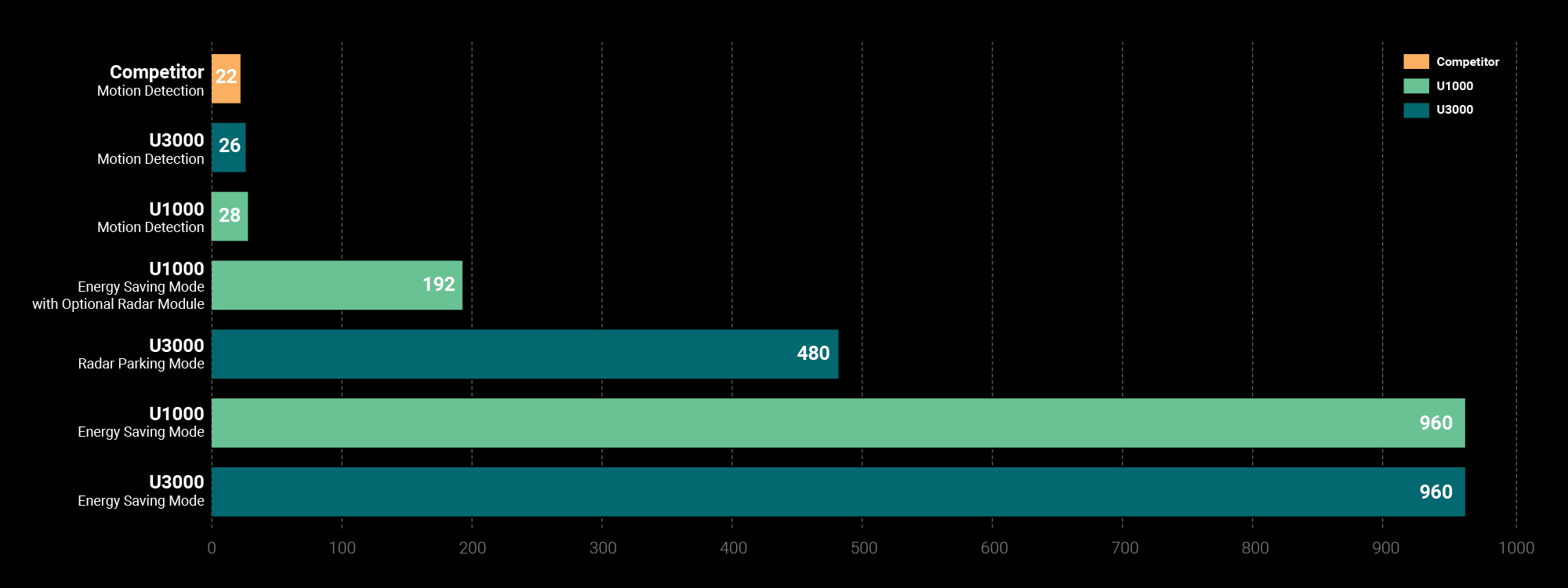
- Based on 2-channel setup, paired with 7500mAh iVolt Xtra External Battery, sold separately.
- These times are based on ideal conditions and actual times may differ.
RADAR PARKING MODE
The dash cam is on standby until a movement is detected. When the Radar Module detects movement, the dash cam wakes and gets ready to record. If an impact is detected, a 20-second video before and after the impact is saved.

IMPACT & MOTION
The dash cam is on standby until an impact is detected. When an impact is detected, the dash cam wakes to record a 20-second video.

ENERGY SAVING PARKING MODE 2.0
The dash cam is on standby until an impact is detected. When an impact is detected, the dash cam wakes to record a 20-second video.

Do I need to use a Dash Cam Battery Pack?
Thinkware Dash Cams offer a few different methods in which the device is powered.
Read more