THINKWARE CONNECTED

THINKWARE CONNECTED Service is an intelligent communication-based service designed to enhance vehicle and driver safety by integrating with dash cams.
It utilizes various communication methods to establish a real-time connection between the dash cam installed in the vehicle and a mobile app.
This service enables immediate access to key events that occur while driving or parked, offering features such as impact notifications, driving history, and remote live video monitoring. By enhancing both driver convenience and vehicle security, THINKWARE CONNECTED Service allows users to easily monitor their vehicle's status—whether they are on the road or away from the car.

THINKWARE CONNECTED App compatible with U3000 PRO, U3000, U1000 Plus, Q1000, and Q850

Impact Notifications While Driving

Impact Notifications When Parked

Captured Image of Most Recent Parking

Send Emergency Message

Strong Impact Notifications While Driving (with Video)

Monthly Driving Reports

Vehicle Status & Driving History

Remote Live View

Geofence

Disclaimer:
1. To connect the dash cam to the internet, use the THINKWARE Dash Cam Link App. Once the dash cam is connected to the internet, you can go to the THINKWARE CONNECTED app to get access to Connected features.

Strong Impact Notifications while Driving

A serious impact stronger than 3g will trigger the Thinkware CONNECTED to show a notification on the app and send an emergency message to your registered contacts. The notification and message will contain crucial information like where the accident took place and a link to a 20-second video clip of the accident (10 seconds before and after the impact). This clip is saved on the server automatically and you can access it later as well. This feature is helpful in case of a potential major incident so your loved ones or fleet manager can take swift action.

*No new videos can be recorded while saving the 20 seconds of the first impact file.

Impact Notifications
when Parked

If an impact is detected while the car is parked, the app will receive a notification automatically. A 20-second video of the incident (10 seconds before and after the incident) is also saved on the Thinkware CONNECTED server if the user gives consent, and can be checked later from the app.

*The dash cam must have Parking Surveillance mode enabled.

Send
Emergency Message

In emergency situations, when you are unable to reach the phone, pressing the REC button on the dash cam for more than 3 secs will send an emergency message to your registered contact.

* A 10-second video (5 seconds before and after the incident) will also be uploaded to the server automatically

Remote
Live View

Check what is happening around your vehicle in real time, no matter where you are.

Vehicle Status &
Driving History

Find important information like the location of your vehicle, whether it is parked or driving, your routes, driving behavior, battery voltage, etc. all from the app.

Captured Image of
Most Recent Parking

You can check the images of your front and rear view cameras of where you last parked, so you won’t have to remember where you parked your vehicle.

* The dash cam must have Parking Surveillance mode enabled.

PLATFORMS

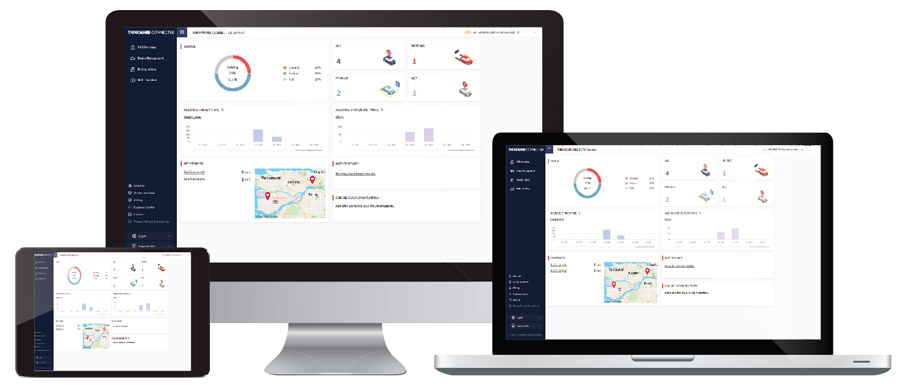
You can access the THINKWARE CONNECTED on both the smartphone app as well as your mobile and desktop browser.

The dashboard on the desktop version gives a summary of the driving behavior of each vehicle linked to the account. If you are a fleet owner who needs to monitor a number of vehicles, managing the THINKWARE CONNECTED features on your PC or laptop might be a more practical option.

What do I need to use THINKWARE CONNECTED?
Compatible Dash Cam

Smartphone with Data Plan

THINKWARE Dash Cam Link App

THINKWARE CONNECTED App with Account

Hotspot or Wi-Fi Network with Internet Access*
Compatible Dash Cam

Smartphone with Data Plan

THINKWARE Dash Cam Link App

THINKWARE CONNECTED App with Account

Hotspot or Wi-Fi Network with Internet Access*

* The smartphone used to set up the Internet connection on the dash cam cannot also be used as a mobile hotspot for the dash cam. A different hotspot device/ smartphone is required. The Dash Cam must be connected to the internet to access CONNECTED features. Connecting the dash cam to a mobile hotspot device or a Wi-Fi network with Internet access will consume data. Carrier/Service Provider charges may apply.

How to set up THINKWARE CONNECTED?
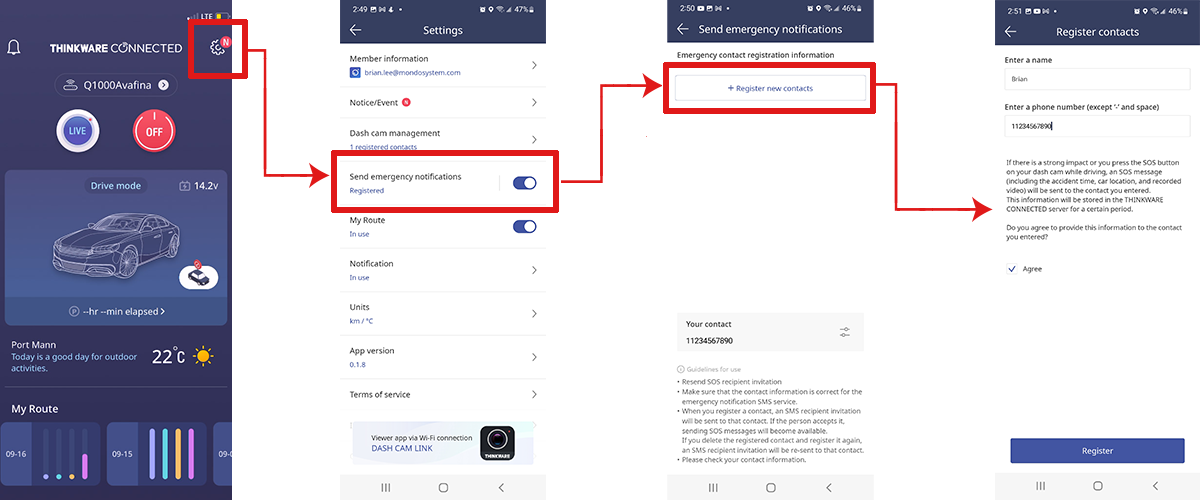
THINKWARE CONNECTED How to set up the Emergency Text Messages feature?

Your registered contact will have to give their consent to receive emergency and impact notifications by clicking on the link provided in the message sent to them.
For a detailed tutorial on how to set up the THINKWARE CONNECTED App, please go to our YouTube channel.

iOS

Android

FAQs

Is THINKWARE CONNECTED free?

THINKWARE CONNECTED is free to download and use with a compatible THINKWARE Dash Cam. Connecting the dash cam to a mobile hotspot device or a Wi-Fi network with Internet access will consume data. Carrier/Service Provider charges may apply.

Do I need both THINKWARE Dash Cam Link and THINKWARE CONNECTED apps?

Yes, you need both apps, THINKWARE Dash Cam Link App to connect to the internet, and THINKWARE CONNECTED to access CONNECTED features.

THINKWARE Dash Cam Link AppTHINKWARE CONNECTED App
For Internet ConnectionFor THINKWARE CONNECTED Features
Can I access THINKWARE CONNECTED on a web browser?

Yes, you can access the THINKWARE CONNECTED on both the smartphone app as well as your mobile and
desktop browser.. The dashboard on the desktop version gives you more information like all registered dash cams, driving routes, status of the vehicles, etc.
 

Can multiple phones be signed into the same THINKWARE CONNECTED account and receive the same notifications?

No, you can sign in to an account on only one platform at a time. For example, you will get logged out from the app on your current smartphone if you sign in on the app on another smartphone.

Can I receive notifications from multiple dash cams?

Yes, each dash cam must be registered to your THINKWARE CONNECTED account. Depending on your plan, you can register from 2 to an unlimited number of dash cams on one THINKWARE CONNECTED account.

Can I add multiple internet connections to the same app?

Yes. You can add multiple connections like a dedicated hotspot device, your home, and office Wi-Fi, on the app, and when it is in range, the dash cam will automatically connect with the available network.

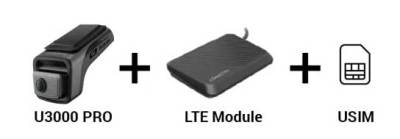
U3000 PRO + LTE Module (USIM Included)

U3000 / U1000 PLUS / Q850

3-Year Free Basic Service

No extra devices needed

24/7 Always-On Connectivity

5-Year Free Basic Service

Mobile hotspot device
or
a Wi-Fi network needed

THINKWARE CONNECTED uses network data.
LTE Module (sold separately)

Connecting the dash cam to a mobile hotspot device or
a Wi-Fi network with Internet access will consume data.
Carrier/Service Provider charges may apply.

Features

U3000 PRO + LTE Module(USIM Included)

U3000 / U1000 PLUS / Q850

BASIC

PREMIUM

Wi-Fi

Service Plan
Price (USD)
(Taxes/VAT Included)

Free

for 3 years
Then $3.49/mo or $34.99/yr

$8.90/mo

or $89/yr • Free 1 month trial

Free

for 5 years
Then $6.90/mo or $69.00/yr

Device Compatibility

U3000 PRO + LTE Module

U3000 PRO + LTE Module

U3000 / U1000 PLUS / Q850

Emergency Contacts

1 contact

2 contacts

2 contacts

Parking Impact Alerts

10 alerts/day
(Thumbnails)

Unlimited

(Thumbnails + Videos)

300 videos/mo

(Thumbnails + Videos)

Driving Impact Alerts

Alerts Only

Unlimited

(10 Videos/mo)

Unlimited

(10 Videos/mo)

Geo-Fence

2 zones

5 zones

5 zones

Remote Live View

10 mins/mo

Unlimited

300 mins/mo

Send SOS Videos

X

10 uploads/mo

10 uploads, 100 downloads/mo

Last Parking Location

4 images/day

Unlimited

1,550 times/mo

My Route

90 Days Route

90 Days Route + Monthly Reports

30 Days Route

Data Updates

X

Firmware & Speed Cam Data

Firmware & Speed Cam Data

Device Limit Per Account

30 Dash Cams

100 Dash Cams

30 Dash Cams

U3000 PRO + LTE Module (USIM Included)

3-Year Free Basic Service

No extra devices needed

24/7 Always-On Connectivity

THINKWARE CONNECTED uses network data. LTE Module (sold separately)

U3000/U1000 PLUS/Q850

5-Year Free Basic Service

Mobile hotspot device
or
a Wi-Fi network needed

Connecting the dash cam to a mobile hotspot device or a Wi-Fi network with Internet access will consume data. Carrier/Service Provider charges may apply.

Features

U3000 PRO +
LTE Module
(USIM Included)

U3000 /
U1000 PLUS /
Q850

BASIC

PREMIUM

Wi-Fi

Service Plan
Price (USD)
(Taxes/
VAT Included)

Free

for 3 years
Then $3.49/mo or $34.99/yr

$8.90/mo
or $89/yr
• Free 1 month trial

Free
for 5 years
Then
$6.90/mo or
$69.00/yr

Device Compatibility

U3000 PRO
+ LTE Module

U3000 PRO
+ LTE Module

U3000 /
U1000 PLUS /
Q850

Emergency
Contacts

1 contact

2 contacts

2 contacts

Parking
Impact
Alerts

10 alerts/day
(Thumbnails)

Unlimited
(Thumbnails
+ Videos)

300 videos/mo
(Thumbnails
+ Videos)

Driving Impact Alerts

Alerts Only

Unlimited

(10 Videos/mo)

Unlimited

(10 Videos/mo)

Geo-Fence

2 zones

5 zones

5 zones

Remote Live View

10 mins/mo

Unlimited

300 mins/mo

Send SOS Videos

X

10 uploads/mo

10 uploads, 100 downloads/mo

Last Parking Location

4 images/day

Unlimited

1,550 times/mo

My Route

90 Days Route

90 Days Route + Monthly Reports

30 Days Route

Data Updates

X

Firmware & Speed Cam Data

Firmware & Speed Cam Data

Device Limit Per Account

30 Dash Cams

100 Dash Cams

30 Dash Cams

USIM Supported Countries

USIM connectivity is supported in a total of 26 countries. LTE service cannot be used in countries outside this coverage. 
Supported Countries


AustraliaCanadaHong KongIndia
IndonesiaIsraelJapanKorea, Republic of
KuwaitMacauMalaysiaMyanmar
New ZealandOmanPakistanPhilippines
QatarSaudi ArabiaSingaporeTaiwan
ThailandTurkeyUnited Arab EmiratesUnited Kingdom
United StatesVietnam